
This is the documentation of Passion Graphic's API. This API uses resource-oriented URLs and is secured by an API key.
The API is reserved for Passion Graphic's customers. If you need an access, please reach out via tech@passion-graphic.fr.
If you are expecting issues using the API, please contact us using the same email above.
Prouduction URL: https://api.passion-graphic.fr/v1
First of all, you need to authenticate your request in order to make successful API calls. The API use the API key authentication scheme. To get an API key, you first need to contact us at tech@passion-graphic.fr.
The API key must be present in the header x-api-key.
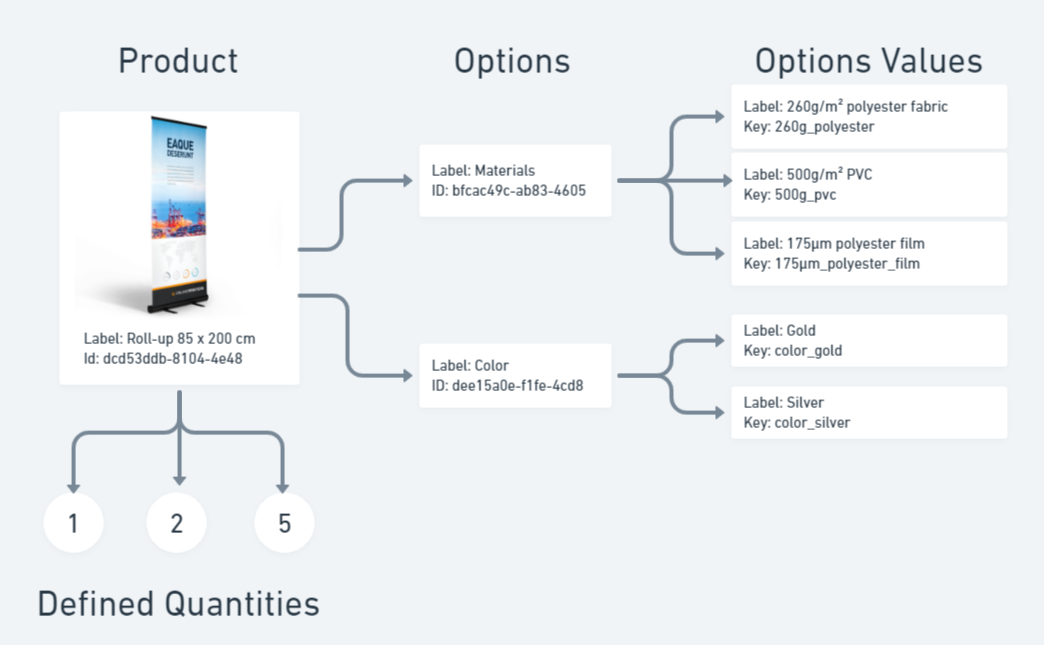
Products can have multiple options and a set of defined quantities. When options are set for a product, you need to specify the desired option during the order.
To provide an option, you need to submit the option ID with the option value key in the items.options property when creating a new order.
The same logic applies for defined quantities. If the product contains a set of available quantities, you need to select the desired quantity during the order in the property items.quantity.
If no defined quantities are set, it means you can put your own quantity, minimum to 1.
Note that some options are mandatory and need to be provided during the order.
The Product endpoints will give you information on products, like their available options and defined quantities.
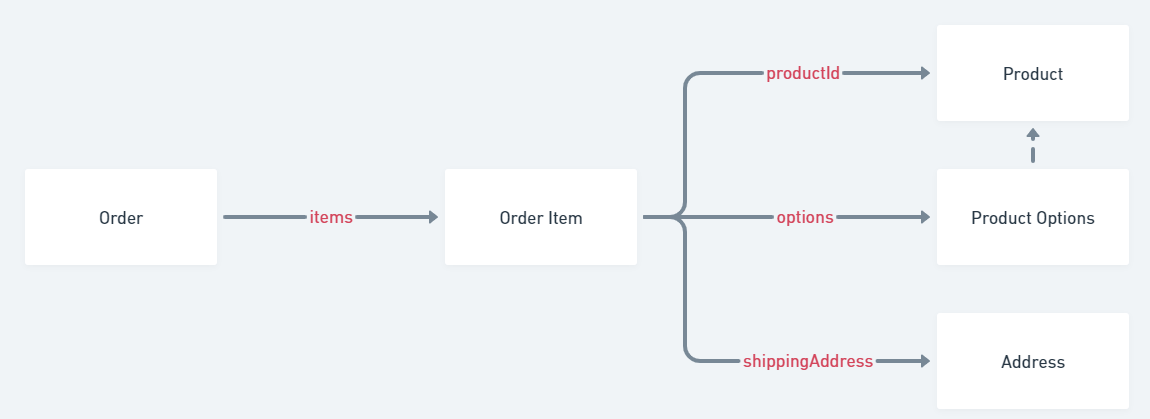
An order can have multiple products. An order item is a product with desired quantity and selected options. Each order item has a shipping address, so that you can specify different addresses for each product if you want to.
Use the Create Order endpoint to submit your order.
To know the total cost of your order that will vary depending on your products, quantities and options, you can use the Generate Quote endpoint.
Once you successfully created an order, you can use the provided orderId to get the order status with the order items statuses by requesting the Get order statuses endpoint.
ORDER_CREATED | The order has successfully been received and will be processed shortly. |
IN_PROGRESS | The order is being processed. |
CANCELLED | The order has been canceled. |
COMPLETED | The order is successfully completed. |
PENDING | The order item is waiting to be processed. |
IN_PRODUCTION | The item is in the production phase. |
SHIPPED | The item package has been shipped. |
CANCELLED | The order item has been canceled. |
COMPLETED | The order item is successfully completed. |
Before creating an order, you can compute the total amount using the Generate a quote endpoint.
Be careful to provide valid options and valid quantities for your items. If you don't, the endpoint will return a 400 error response. Read the "Choosing products" for more information.
Create a new pet in the store
| orderReferenceId required | string Refer to your internal order ID. Must be unique. |
required | Array of objects (OrderItem) [ items non-empty ] Array of the ordered products. |
object (ShippingAddress) The billing address. | |
object (OrderContact) Information about who made the order | |
object A free flat object containing custom extra information about the order. |
{- "orderReferenceId": "MY-ORDER-ID-452",
- "items": [
- {
- "itemReferenceId": "MY-PRODUCT-REF-452",
- "productId": "bfcac49c-ab83-4605-bb3a-e95942025d69",
- "quantity": 10,
- "productionDelay": 1,
- "options": [
- {
- "optionId": "dee15a0e-f1fe-4cd8-88ac-c090810707f8",
- "optionValueKey": "Full_Colour_Print_2_Sided"
}
], - "shippingAddress": {
- "name": "Passion Graphic",
- "addressLine1": "11 Rue Denis Papin",
- "addressLine2": "",
- "postcode": "77680",
- "city": "Roissy-en-Brie",
- "countryCode": "FR",
- "phone": "06 12 34 56 78"
}, - "customData": {
- "customerNotes": "Only face B"
}
}
], - "billingAddress": {
- "name": "Passion Graphic",
- "addressLine1": "11 Rue Denis Papin",
- "addressLine2": "",
- "postcode": "77680",
- "city": "Roissy-en-Brie",
- "countryCode": "FR",
- "phone": "06 12 34 56 78"
}, - "contact": {
- "firstName": "John",
- "lastName": "Doe",
- "email": "john.doe@mail.com"
}, - "customData": {
- "code": 784123
}
}{- "orderId": "b3e1eced-f2bd-4d8c-9765-fbc9d1d222d5"
}Search the order by the given ID. Returns the order found otherwise a 400 error response.
| orderId required | string Examples: c33d5b69-555d-4045-86d2-85c66bc9d0d0 |
{- "id": "58f97ce4-0338-41f1-9f8e-b91da977423a",
- "status": "ORDER_CREATED",
- "orderReferenceId": "ORDER-REF-AB12XSVAYXWxQZAZXYA",
- "billingAddress": {
- "name": "Jane doe",
- "addressLine1": "100 Main street",
- "addressLine2": "",
- "city": "Chicago",
- "countryCode": "US",
- "postcode": "60001",
- "phone": "N/A"
}, - "contact": {
- "email": "test@mail.com",
- "firstName": "Tester",
- "lastName": "Tester"
}, - "price": {
- "currency": "EUR",
- "items": {
- "base": 312.93,
- "taxes": 39.12,
- "total": 352.05
}, - "total": 352.05
}, - "customData": {
- "orderExtCode": "CODE",
- "num": 789
}, - "items": [
- {
- "id": "3eaf6aa2-f565-4738-8569-10a5d3c36e9b",
- "itemReferenceId": "PRODUCT-REF-YYXxAwADVZVYXZA",
- "orderId": "58f97ce4-0338-41f1-9f8e-b91da977423a",
- "fileUrls": [ ],
- "productId": "01794521-3955-4644-a710-5183513c6f5b",
- "status": "PENDING",
- "quantity": 2,
- "productionDelay": 1,
- "shipping": {
- "estimatedDeliveryDate": "2023-11-17",
- "address": {
- "name": "Jane doe",
- "addressLine1": "100 Main street",
- "addressLine2": "",
- "city": "Chicago",
- "countryCode": "US",
- "postcode": "60001",
- "phone": "N/A"
}
}, - "options": [
- {
- "optionId": "52b47810-d879-4b26-9ea4-5648b5bc944a",
- "optionValueKey": "2"
}
], - "customData": {
- "productExtCode": "CODE",
- "num": 123
}
}
]
}Return the order status and the order items statuses
| orderId required | string Examples: c33d5b69-555d-4045-86d2-85c66bc9d0d0 |
{- "orderStatus": "processing",
- "items": [
- {
- "orderItemStatus": "shipped",
- "estimatedDeliveryDate": "2019-08-24",
}
]
}Search the product by the given ID. Returns the product found otherwise a 400 error response.
| productId required | string <uuid> Examples: c33d5b69-555d-4045-86d2-85c66bc9d0d0 |
{- "id": "497f6eca-6276-4993-bfeb-53cbbbba6f08",
- "label": "Roll-up 85 x 200 cm",
- "definedQuantities": [
- 10
], - "options": [
- {
- "id": "497f6eca-6276-4993-bfeb-53cbbbba6f08",
- "label": "Lamination",
- "mandatory": true,
- "values": [
- {
- "label": [
- "Glossy"
], - "key": [
- "lamination_glossy"
]
}
]
}
]
}Generate a quote that will contains the total amount for the given order items.
Order items
Array of objects (QuoteRequestItem) |
{- "items": [
- {
- "productId": "bfcac49c-ab83-4605-bb3a-e95942025d69",
- "quantity": 10,
- "options": [
- {
- "optionId": "dee15a0e-f1fe-4cd8-88ac-c090810707f8",
- "optionValueKey": "Full_Colour_Print_2_Sided"
}
]
}
]
}{- "items": [
- {
- "productId": "dcd53ddb-8104-4e48-8cc0-5df1088c6113",
- "quantity": 10,
- "options": [
- {
- "optionId": "dee15a0e-f1fe-4cd8-88ac-c090810707f8",
- "optionValueKey": "Full_Colour_Print_2_Sided"
}
], - "productionDelay": 1,
- "price": {
- "base": 50,
- "taxes": {
- "rate": 20,
- "amount": 10
}, - "total": 60
}
}
], - "costSummary": {
- "items": {
- "base": 50,
- "taxes": 10,
- "total": 60
}, - "total": 60,
- "currency": "EUR"
}
}